Column-width - CSS Property
Summary of characteristics of the column-width property
autoautoComputed value: during an animation, the column-width property gradually changes from one value to another.
(1) Percentages are not allowed as that would fix the number of columns (50% necessarily means two columns). While the property
column-width defines a minimum width for the columns, the number of columns is variable.
Syntax diagram of column-width.
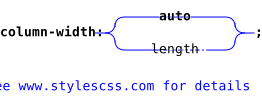
column-width property.The links in the diagram provide more details about the values.
Download the diagram in SVG.
In the diagram, the bold terms are the predefined words of CSS, the other terms are described below:
lengthis a numeric value, positive or zero, followed by one of the CSS dimension units.
Description of the column-width property.
column-width defines the minimum width of the columns, which means that if there is space to display wider columns, the browser will do so.
If we want to impose a very specific column width, the only way will be to also define the width of the container and the width of the gap.
For a general overview of multi-column layouts and for more sensitive management (auto-adaptation of columns to the screen size), refer to the
CSS property columns.
Values for column-width.
- column-width: auto;
Default value. The width of the columns is determined by the number of columns and the available width. If the number of columns is not defined either, the text will be displayed in a single column with a width of 100%.
- column-width: 200px;
The columns will have a minimum width corresponding to the indicated value. However, if there is enough available space, the browser may display wider columns.
The value must be a positive number followed by a unit of measurement (see the CSS dimension units). Percentages are not allowed.
- column-width: initial; (
auto) column-width: inherit; column-width: revert; column-width: revert-layer; column-width: revert-rule; column-width: unset;Common values are presented on these pages:
initial,inherit,revert,revert-layer,revert-rule,unset.
Animation of the column-width property.
In this first example, the number of columns (column-count) is not defined. The browser therefore calculates the number of columns by dividing
the available width by the width of the columns. Since this varies between 300 and 600 pixels, the number of columns changes accordingly.
In the second example, the maximum number of columns column-count is set to 2. In its animation, the browser adheres to this constraint.
Access the column-width property via a program
Change the width of the columns in Javascript.
Here is how to modify the width of the columns for an element el in Javascript. Javascript accepts a syntax with the typical CSS notation,
in kebab-case (a dash to separate the words), and another syntax with the more common camel-case notation in Javascript
(an uppercase letter to separate the words).

	let el = document.getElementById('id');
	el.style['column-width'] = '5cm';
	// or
	let el = document.getElementById('id');
	el.style.columnWidth = '5cm';
Read the width of the columns in Javascript.
The property column-width must have been directly applied in the HTML code with the style attribute and not via CSS using a selector.
The column width is returned in the unit used to define it.
	let el = document.getElementById('id');
	let value = el.style['column-width'];
	// or
	let el = document.getElementById('id');
	let value = el.style.columnWidth;
Read the computed value of column-width in Javascript.
The computed value results either from the direct application of a value to the property column-width, or from the inheritance mechanism.
The column width is returned in pixels, regardless of the unit chosen to define it.
	let el = document.getElementById('id');
	let value = window.getComputedStyle(el).getPropertyValue('column-width');
Change the width of columns with JQuery.

 $('#id').css('column-width', '5cm');
 // or
 $('#id').css('columnWidth', '5cm');
Read the computed value of the property column-width with JQuery.
Reading the property can be done with the following code. As in Javascript, the width is returned in pixels, even if a different unit was used to define it.
let value = $('#id').css('column-width');
Other code examples.
Other examples of Javascript and JQuery code are provided on the page Javascript and CSS.
Test it yourself.
The buttons below display either the value as it was applied to the property or the computed value. This second option allows you to see how the value of
column-width is stored (serialized). It is particularly noted that all other units are converted into pixels.
Simulator.
Adjust the width of the columns by changing the value in the input box, and observe the result in the frame below. It should be noted that columns that are too narrow disrupt the justification of the text, creating large spaces between words, or even making justification impossible when a single word fits within the width of the column.
For this reason, we set the value of hyphens to auto in order to implement automatic hyphenation. However, below 150 pixels, the layout
is compromised and reading becomes difficult.
Sur ce deuxième exemple, le nombre de colonnes maximal est fixé à 3 par la propriété column-count.
In this example, the number of columns is not specified. It is therefore auto, the initial value for the property column-count.
The browser is free to enforce the requested number of columns to respect their width.
column-count. Here, the property column-count
is set to 2. The number of columns will never exceed 2, even if the width of the columns drops below approximately 300 pixels.
Browsers compatibility with column-width.
The compatibility of the multi-column layout seems poor but it's only due to the break properties break-before, etc. that are not recognized properly.
column-width property to define the minimum width for columns (multicolumn layout).Notes:
(1) Does not support the values avoid (in the column context), avoid-column, and avoid-page for the properties break-after, break-before, and break-inside.
layout
column-widthproperty
Browsers on computers :
Mobile browsers :
Outdated or marginal browsers :

Internet Explorer

UC Browser pour Androïd

Opéra Mobile

QQ Browser

Baidu Browser

Safari

Safari sur IOS

Opéra

Chrome

Edge

Firefox

Chrome pour Androïd

Samsung Internet

Androïd Brower

Firefox pour Androïd

KaiOS Browser

Opéra mini
Historic of the column-width property.
-
CSS Multi-column Layout Module Level 1
This specification describes multi-column layout. It is enough to set the number of columns on the container, and the content will be arranged across the specified number of columns. Of course, other properties allow finer control over multi-column containers.
This specification also defines properties concerning the space between columns and any possible dividing line.Regardingcolumn-widthIntroduced multi-column layouts, and corresponding properties, includingcolumn-width. June 23, 1999Working Draft.
 December 17, 2009Candidate Recommendation.

-
CSS Multi-column Layout Module Level 2
Few new features on level 2 of this specification. Simply note a pseudo-element
::columnwhich allows targeting the columns themselves (all columns at once). It accepts few properties.December 19, 2024Working Draft.
See also, regarding multi-column layouts.
The property column-width is referenced in the specification CSS Multi-column Layout Module, which describes everything related to multi-column layouts.
The terms below are also described in this same specification:
Properties:
