Column-count - CSS Property
Summary of characteristics of the column-count property
autoautoInteger: during an animation, the column-count property passes from one integer to another, without transition.Syntax diagram of column-count.
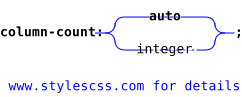
column-count property.The links in the diagram provide more details about the values.
Download the diagram in SVG.
In the diagram, the bold terms are the predefined words of CSS, the other terms are described below:
integeris an integer equal to or greater than1.
Description of the column-count property.
column-count defines the number of columns in a multi-column layout. This property works in conjunction with the width of the columns
(see column-width) :
- If
column-widthis not defined or has the valueauto, the number of columns is exactly that defined bycolumn-count. - If the value of
column-widthis set,column-countthen indicates the maximum number of columns. The number of columns may therefore be smaller to allow their display in the requested width.
If forced column breaks exist in the content of the element, they can cause the creation of more columns than expected by column-count.
Reminder: forced column breaks are defined by the properties break-before and 
break-after .
For a general presentation of column layouts, refer to the explanations on the property page columns.
Values for column-count.
- column-count: auto;
Default value. The number of columns is determined from the width of the columns (see
column-width). If the latter is not defined, the number of columns is equal to 1. - column-count: 3;
A number without a unit, greater than zero.
- column-count: initial; (
auto) column-count: inherit; column-count: revert; column-count: revert-layer; column-count: revert-rule; column-count: unset;Common values are presented on these pages:
initial,inherit,revert,revert-layer,revert-rule,unset.
Animation of the column-count property.
The property column-count can be animated progressively. But since the number of columns can only be an integer, the animation will necessarily be jerky.
Access the column-count property via a program
Change the number of columns in Javascript.
JavaScript accepts at least two syntaxes for modifying the value of a property. The first, with the name of the property written in kebab-case
(a dash to separate words), and the second with camel-case notation (an uppercase letter to separate words).

	let el = document.getElementById('id');
	el.style['column-count'] = '2';
	// or
	let el = document.getElementById('id');
	el.style.columnCount = '2';
Read the number of columns in Javascript.
The code example below retrieves the value of column-count if it has been assigned in the HTML code, through the style attribute of the element.
Values set via a CSS selector are not taken into account.
	let el = document.getElementById('id');
	let value = el.style['column-count'];
	// or
	let el = document.getElementById('id');
	let value = el.style.columnCount;
Read the computed value of column-count in Javascript.
The computed value is either a value directly assigned to the element via a CSS selector or the style attribute, or it is an inherited value,
or it is the initial value of the property (auto in the case of column-count).
	let el = document.getElementById('id');
	let value = window.getComputedStyle(el).getPropertyValue('column-count');
Change the number of columns with JQuery.
JQuery also accepts two formats for the property name: in kebab-case or in camel-case.

 $('#id').css('column-count', '2');
 // or
 $('#id').css('columnCount', '2');
Read the computed value of the property column-count with JQuery.
let value = $('#id').css('column-count');
Other code examples.
If these codes are not enough for you, see other examples on the page Javascript and CSS.
Test it yourself.
The buttons below apply the entered value to the property column-count and then display either the value as it was applied or the computed value.
Simulator.
if statement in traditional languages, begins to appear in CSS through directives
like @media or @supports. Variables also make their appearance in CSS under the name of custom properties.
Browsers compatibility with column-count.
The compatibility seems poor for multi-column layouts, but this is due to the break properties break-after, etc., which are not well recognized.
column-count property allowing the text to be arranged in multiple columns.Notes:
(1) Does not support the values avoid (in the column context), avoid-column, and avoid-page for the properties break-after, break-before, and break-inside.
layout
column-countproperty
Browsers on computers :
Mobile browsers :
Outdated or marginal browsers :

Internet Explorer

UC Browser pour Androïd

Opéra Mobile

QQ Browser

Baidu Browser

Safari

Safari sur IOS

Opéra

Chrome

Edge

Firefox

Chrome pour Androïd

Samsung Internet

Androïd Brower

Firefox pour Androïd

KaiOS Browser

Opéra mini
Historic of the column-count property.
-
CSS Multi-column Layout Module Level 1
This specification describes multi-column layout. It is enough to set the number of columns on the container, and the content will be arranged across the specified number of columns. Of course, other properties allow finer control over multi-column containers.
This specification also defines properties concerning the space between columns and any possible dividing line.Regardingcolumn-countIntroduced multi-column layouts, and related properties, such ascolumn-count. June 23, 1999Working Draft.
 December 17, 2009Candidate Recommendation.

-
CSS Multi-column Layout Module Level 2
Few new features on level 2 of this specification. Simply note a pseudo-element
::columnwhich allows targeting the columns themselves (all columns at once). It accepts few properties.Regardingcolumn-countNo modification of the propertycolumn-countexcept that values0are now prohibited.December 19, 2024Working Draft.
Other properties related to multi-columns.
Multi-column layouts are described in the specification CSS Multi-column Layout Module. The property column-count is explained in this module.
You will also find the reference for the terms below:
Properties: