Caret-animation - CSS Property
Summary of characteristics of the caret-animation property
auto | manualautoDiscrète: during an animation, the caret-animation property passes from one value to another without transition.Single: single value (no order).Syntax diagram of caret-animation.
Description of the caret-animation property.
caret-animation property is still too poorly supported by browsers, especially by Firefox  and Safari
  }.
}.
Most operating systems make the text cursor blink when it's visible. Don't confuse the text cursor with the mouse pointer. The text cursor is the one that blinks on pretty much all systems, while the mouse pointer is the one that moves with the mouse.
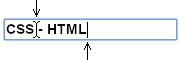
The caret-animation property lets you remove the default animation of the text marker (the blinking).
Other properties manage that famous text cursor (or the mouse pointer, with cursor):
Values for caret-animation.
- caret-animation: auto;
The text cursor isn't changed: it blinks according to what the operating system requests.
- caret-animation: manual;
The text cursor doesn't blink. So you can either leave the cursor steady, or apply an animation to a feature like the cursor's color or shape.
⚠ Firefox
and Safari do not recognize the caret-animationproperty. So the example won't work on these browsers. - caret-animation: initial; (
auto) caret-animation: inherit; caret-animation: revert; caret-animation: revert-layer; caret-animation: revert-rule; caret-animation: unset;See the following pages for more details:
initial,inherit,revert,revert-layer,revert-rule,unset.
Animation of the caret-animation property.
Animating the property caret-animation is possible in discrete mode, but the result isn't impressive at all. Click in the input area to see the result.
⚠ Of course, on Firefox or Safari , the demo doesn't work.
Access the caret-animation property via a program
With Javascript, change the value of caret-animation.
In JavaScript, here's how to change the value of caret-animation, with two possible syntaxes. The first is a syntax using the typical CSS notation,
in kebab-case (a dash to separate words). The second is a syntax using the more common JavaScript camel-case notation
(an uppercase letter to separate words).

	let el = document.getElementById('id');
	el.style['caret-animation'] = 'manual';
	// or
	let el = document.getElementById('id');
	el.style.caretAnimation = 'manual';
With Javascript, read the value of caret-animation.
The property must have been applied directly to the element itself via its style attribute, like in the previous code, and not through
a CSS selector.
	let el = document.getElementById('id');
	let value = el.style['caret-animation'];
	// or
	let el = document.getElementById('id');
	let value = el.style.caretAnimation;
With Javascript, read the computed value of caret-animation.
The computed value is the one assigned to the element, or the one that results from the cascade of inheritances, or it's the initial value of the property
(auto in the case of caret-animation).
	let el = document.getElementById('id');
	let value = window.getComputedStyle(el).getPropertyValue('caret-animation');
With JQuery, read or change the value of caret-animation.
JQuery syntaxes are always shorter than Javascript syntax.

 // Read the value:
 $('#id').prop('caret-animation');
 // Write the value:
 $('#id').prop('caret-animation', 'manual');
 $('#id').prop('{caret-animation': 'manual'});
With JQuery, read the computed value of caret-animation.
let value = $('#id').css('caret-animation');
Other code examples.
Other examples of Javascript and JQuery code are given on the page Javascript and CSS: adding a style sheet to the page, adding or removing classes, etc.
Test it yourself.
The buttons below apply the entered value to the caret-animation property and then show either the value as it was applied or the computed value.
The second option lets you see how the value of caret-animation is stored (serialized). For this property, the computed value is the same as
the assigned value, except when trying to assign an incorrect value.
⚠ Of course, on browsers that don’t recognize the property (like Firefox or Safari ), the value is still always incorrect.
Simulator.
To really see the effect of the simulator, click in the textarea area or in the text input area after choosing a value for caret-animation.
Remember that caret-animation only affects the blinking of the text cursor, not its presence.
Browsers compatibility with caret-animation.
The caret-animation property is still too poorly handled by browsers. It can be used, but only in non-critical cases.
caret-animationproperty
Browsers on computers :
Mobile browsers :
Outdated or marginal browsers :

Internet Explorer

UC Browser pour Androïd

Opéra Mobile

QQ Browser

Baidu Browser

Samsung Internet

Edge
Safari

Chrome pour Androïd

Safari sur IOS

Firefox pour Androïd

Chrome
Firefox

Opéra

Androïd Brower

KaiOS Browser

Opéra mini
Historic of the caret-animation property.
-
CSS Basic User Interface Module Level 4
This level 4 of the specification builds on the definitions already established in level 3. It also includes some additions: text marker management is more detailed, several properties concern the mouse pointer, etc.
Regardingcaret-animationIntroduction of thecaret-animationproperty. September 22, 2015Working Draft.


See also, regarding the user interface.
The CSS Basic User Interface Module gathers all the properties that let you adjust the user interface (mouse cursor, text cursor color and shape, mouse event handling, etc.), but also the outline properties.
Properties:

interest-delay-start and interest-delay-end.