Linear() - CSS Function
Summary of characteristics of the linear() function
animation-timing-function or transition with transition-timing-function.Not animable: the linear() property cannot be animated.Per grammar: serialization in the order of syntax.Syntax diagram of linear().
linear() function.Click on the terms of the diagram for more precision.
Download the diagram.
On the diagram, the terms in bold are the predefined terms in CSS, the others are described below:
xis a numerical value without a unit.yis a percentage.- Several values or pairs of values can be listed, separated by commas. You need at least two.
Description of the linear() function.
linear() is an acceleration function that, as its name suggests, is linear. It can be used with animation-timing-function or
transition-timing-function.
linear` was first defined as a value (level 1 of the specification), just like ease-in or ease-out, etc.:
the progression was linear from start to finish of the animation. Level 2 added parameters: the key points. But the linear value can still be used:
it’s equivalent to linear(0, 1). In that case, it shouldn’t have parentheses.
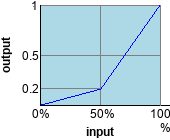
linear(0, 0.2, 1)Example containing only unique values.

linear(0, 0.25 60%, 1)Example containing a double value.
The linear() value can be used with the following properties:
animation-timing-function: Defines the easing function to be used during an animation.transition-timing-function: A property that defines the easing function to be used during a transition.
Syntaxes of the linear() function.
- <property>: linear;
Just a reminder that the function
linear()can be used without a parameter. In that case, you should skip the parentheses. The notation is then equivalent tolinear(0, 1).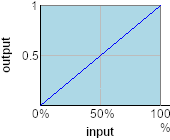
- <property>: linear(0, 0.2, 1);
A series of unitless values, separated by commas. They indicate the
yvalues of the breakpoints. Thexvalues are assumed to be evenly spaced on the axis between0and1. There can be as many values as needed, but they must be listed in ascending order.These values can't be percentages. However, they can be less than
0or greater than1.At least two values are needed for the function.
linear(0, 0.2, 1) - <property>: linear(0, 0.75 80%, 1);
Each pair of values (separated by a comma) corresponds to the coordinates of the stop points. The first value corresponds to
y; it can be less than0or greater than1but it can't be a percentage. The second value corresponds tox; it must be a percentage, and it's a value less than0%or greater than100%.It’s possible, as is the case in our example, to mix the previous syntax (simple values) with this syntax using value pairs. To use a double syntax with
0, make sure to writelinear(0 0%, ...).
linear(0, 0.25 60%, 1)
Examples of use of the function linear().
Quadratic function.
The function linear() is particularly handy for approximating a curve with straight line segments. Here is the function y = x²
made with ten straight line segments.
Function 1 / x.
It's the same thing for the function y = 1/x. The value 0 wasn't included to avoid creating an infinity value.
Function y = x³.
We could come up with endless examples. Our examples have 10 points, but we can put in as many as we want.
Animation with the linear() function.
The function linear(), which can only be used with properties meant for declaring animations, cannot be animated.
Browsers compatibility with linear() function.
linear() function, which defines a linear acceleration curve for the animation-timing-function and transition-timing-function properties.linear()function
Browsers on computers :
Mobile browsers :
Outdated or marginal browsers :

UC Browser pour Androïd

Opéra Mobile

QQ Browser

Samsung Internet

Chrome

Edge

Safari

Opéra

Chrome pour Androïd

Safari sur IOS

Androïd Brower

Firefox pour Androïd

Firefox

KaiOS Browser
Historic of the linear() function.
-
CSS Easing Functions Level 1
Regardinglinear()Definition oflinearas a value (no parameters) simply providing a linear easing function. February 21, 2017Working Draft.
 April 30, 2019Candidate Recommendation.

-
CSS Easing Functions Level 2
Regardinglinear()Added parameters tolinear(), making it a function.August 29, 2024Working Draft.
See also: easing functions.
Functions:
animation-timing-function or transition with transition-timing-function.