Top - CSS Property
This page is also about physical property(ies):
Summary of characteristics of the top property
autoautoComputed value: during an animation, the top property gradually changes from one value to another.Single: single value (no order).Description of top, right, bottom et left properties.
These four properties define the position of an element when that element is positioned. An element is said to be "positioned" when it is taken out of
the normal flow of the display, that is when its property position has a value other than static (see the property position).
position: static:top, right, bottom, and left have no effect.
The position of the element is determined by its order in the code and its margins.
position: absolute:position: fixed:position: relative:position: sticky:relative as long as the element is in the
viewport, and as if the position were fixed when the element reaches the edge of the viewport during page scrolling.
In other words, sticky elements always remain visible on the screen.
top, right, bottom, and left define the space between the edge of the reference element or the viewport
and the corresponding margin of the positioned element, as shown in the diagram below:
Last positioned element or viewportt
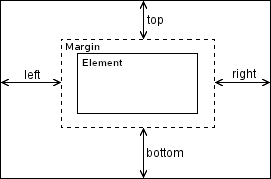
The two properties that act in the same direction (left and right, for example) can therefore come into conflict.
Here’s how this is resolved:
- If
leftandrightare set and the width of the element (width) isauto, the element is sized to satisfy both the values given toleftandright. - If
leftandrightare set and the width of the element is also fixed, therightproperty is ignored.
A similar rule can be found in the vertical direction:
- If
topandbottomare set and the element's height isauto, the element is sized to satisfy the given values fortopandbottom. - If
topandbottomare set and the height of the element is also imposed by theheightproperty, the value ofbottomis ignored.
The shorthand property inset.
A property allowing the four positioning values to be set in a single declaration has been defined: inset. Its name does not match CSS conventions,
as the name of a shorthand property is generally the root of the names of the grouped properties. Margin, for example, is the shorthand property
for margin-top, margin-right, margin-bottom, and margin-left.
Since the properties top, right, bottom, and left have no common part in their names, the usual rule
could not be applied.
But what's even stranger is that properties whose names start with inset have also been defined, but they are logical properties, meaning
they act according to the writing mode of the language (see below). Refer to the description of the property inset for more details.
Language support.
When the positioning of the element needs to be based on the language, it is better to use the following logical properties:
inset-block-start: equivalent totopfor latin languages.inset-inline-start: equivalent toleftfor latin languages.inset-block-end: equivalent tobottomfor latin languages.inset-inline-end: equivalent torightfor latin languages.
And the following two short-hand properties:
inset-block: short-hand property forinset-block-startandinset-block-end.inset-inline: short-hand property forinset-inline-startandinset-inline-end.
Attention! There is also a property inset, but it is not the summarized property of the four above because it is a physical property, not a logical one.
topleftrightbottomSyntaxes for top,right,bottom and left.
- top: auto; right: auto; bottom: auto; left: auto;
The browser determines the element's position by itself. In general, the element stays in the position it would have had in
staticmode. - top: 10px; right: 10px; bottom: 10px; left: 10px;
The position of the element is set according to the specified values. It is not at all necessary to define a value for all four properties.
The value can be positive or negative, as long as it does not lead to an impossibility. It must be followed by a unit of measurement (see CSS dimension units).
Percentages are evaluated relative to the dimensions of the parent block. Percentages on
leftandrightare evaluated relative to its width, while those ontopandbottomare evaluated relative to its height. - top: initial; (
auto) top: inherit; top: revert; top: revert-layer; top: revert-rule; top: unset;right: initial; (auto) right: inherit; right: revert; right: revert-layer; right: revert-rule; right: unset;bottom: initial; (auto) bottom: inherit; bottom: revert; bottom: revert-layer; bottom: revert-rule; bottom: unset;left: initial; (auto) left: inherit; left: revert; left: revert-layer; left: revert-rule; left: unset;For more information, refer to the presentation pages of these different values:
initial,inherit,revert,revert-layer,revert-rule,unset.
Animation of top, right, bottom and left.
These four properties are frequently used in animations. They are very smooth (animation of a dimension in pixels).
In our example, the element is positioned as relative, and the properties left and top are animated.
Simulator with these four properties.
The simulator acts on the blue element whose position has been set to absolute and whose dimensions (width and height) are auto.
Its parent has a relative position without any specific positioning instructions. By changing the values for the positioning properties below,
you will see the element move across the screen, and possibly change dimensions. Of course, it may seem to leave its parent, but the parent still serves
as the reference for positioning.
relative.
position:absolute(for simulator).
Compatibility.
The four physical properties are correctly handled by all browsers. Their logical equivalents are not recognized by Internet Explorer  , but this browser is no longer used.
top, right, bottom, and left.inset shorthand property, which sets the position for positioned elements (whose position property is different from static).inset-block-start, inset-block-end, inset-inline-start, and inset-inline-end.top bottom
right leftproperties
insetproperty
inset...logical properties
Browsers on computers :
Mobile browsers :
Outdated or marginal browsers :
Internet Explorer

UC Browser pour Androïd

Opéra Mobile

QQ Browser

Baidu Browser

Samsung Internet

Safari

Safari sur IOS

Chrome

Edge

Firefox

Opéra

Chrome pour Androïd

Androïd Brower

Firefox pour Androïd

KaiOS Browser

Opéra mini
History of the properties top, right, bottom, and left.
-
Cascading Style Sheets Level 2 - Revision 1 Specification
This level 2 of the specification describes the mechanism of cascading styles in CSS. This language is used to format HTML or XML documents. It supports media-specific style sheets so that authors can adapt the presentation of their documents for visual browsers, auditory devices, printers, braille devices, portable devices, etc.
RegardingtopIntroduction of the possibility of positioning an element (positionproperty) and properties defining its position:top,right,bottomandleft. November 04, 1997Working Draft.
 March 24, 1998Proposed for recommendation.
 May 11, 1998Recommendation .
 -
CSS Logical Properties and Values Level 1
This specification module defines properties that indirectly define certain other properties depending on the writing mode: left to right, right to left, or top to bottom. They are useful in simple and generic style sheets, such as browser style sheets, but can also save a few lines of styles for documents containing both left-to-right and right-to-left text.
RegardingtopIntroduction of logical propertiesinset...to position an element taking into account the writing mode of the language used.May 18, 2017Working Draft.
-
CSS Positioned Layout Module Level 3
RegardingtopNo change regarding theses properties.February 07, 2012Working Draft.
See also, about positioning.
Properties related to positioning (different from static) are grouped in the CSS Positioned Layout Module.
The following properties are also described in this same module:
Properties:
top, right, bottom and left.inset-block-start and inset-block-end.inset-inline-start and inset-inline-end.